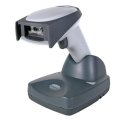
 Honeywell 4820 Cordless 2D Imager Scanner Scanner base and PSU 9v plug and play once configured with the setup scans below RRP £580
The Honeywell 4820 provides the mobility of cordless connectivity.
With Adaptus Imaging that reads 2D matrix bar codes, postal codes, and captures images.
The Honeywell 4820 has Bluetooth® Class II v1.2 technology providing 10 meters (33 feet) of read range and utilizes adaptive frequency hopping for improved performance.
With disinfectant-ready housings designed specifically for healthcare environments.
The 4820 (SR) Standard Range is designed to read 2D bar codes over 10 mil in size.
The 4820 (SF) Special Focus is designed to read 2D bar codes under 10 mil in size.
Honeywell 4820 Cordless 2D Scanner/Imager Features & Benefits
-- Wireless Connectivity Bluetooth v2.0 radio enables movement up to 33´ (10 m)
-- Up to 7 imagers can communicate to 1 base
-- Adaptus™ Imaging Technology with image capture functionality.
-- PDF417, MicroPDF417, MaxiCode, Data Matrix, QR Code, Aztec, Aztec Mesas, Code 49, EAN/UCC Composite, Codabar, Code 39, Interleaved 2 of 5, Code 93, Code 128, UPC, EAN, RSS, Codablock, Postnet, Planet Code, British Post, Canadian Post, Japanese Post, KIX (Netherlands Post), OCR-A, OCR-B
-- Available Interaces Include Keyboard Wedge, USB, TTL level RS-232, wand emulation, TTL level Serial Wedge, and IBM 46XX retail terminals
-- Minimal Base-station footprint that is up to 33% smaller than major competitors’ products
-- Operating Temperature Range- both the 4820 and 2020 Base operate in the following temperature ranges 32 to 122 degrees Fahrenheit (0 to 50C).
RoHSRoHS Compliant
Honeywell 4820 2D Cordless Scanner/Imager Data Sheet (.pdf 171KB)
Honeywell 4820 2D Cordless Scanner/Imager Installation Instructions(.pdf 2.5MB)
P/N 4820SR0C1CB-0FA0E, 2020-5, P/N 42206161-01
Set-up Advice
When setting up a single scanner with one base station, Scan the "Override Locked Image Scanner (Single Image Scanner)" barcode in the set-up manual and then place the scanner i the base-station to make the items pair-up.
Typical set-up Barcode to scan are:


